
Convert Static Forms to Interactive HTML Forms
Transform paper forms, PDFs, or images into interactive HTML forms with data storage. No manual coding, no database setup, no complex deployment.
Why This Matters
The problem: Converting static forms (PDFs, paper forms, images) to digital HTML forms typically requires web development skills, database setup, and hours of coding work.
The FabriXWork way: Your agent converts static forms to interactive HTML forms with local data storage in minutes. Update the form design, regenerate instantly.
See It in Action: Interactive Claim Form with Email Draft
This demo shows how a claim form image becomes an interactive HTML form with email draft instantly.
Note: Some scenes in this video have been accelerated to 10× speed to enhance the viewing experience. The prompt used in this video can be found in the Featured Example section below.
How it Works:
┌──────────────────────────────────────────────────────────┐
│  INPUT                          OUTPUT                   │
│  ┌──────────────┐               ┌─────────────────────┐  │
│  │ claim-form.  │               │  Interactive HTML   │  │
│  │   pdf        │               │  Claim Form         │  │
│  │              │    ──────►    │  • Form Fields      │  │
│  │ (PDF/image/  │     Agent     │  • Validation       │  │
│  │  paper form) │    Build      │  • Email Draft      │  │
│  └──────────────┘               │  • Ready to Send    │  │
│                                 │                     │  │
│                                 │  Single HTML File   │  │
│                                 │  (No server needed) │  │
│                                 └─────────────────────┘  │
└──────────────────────────────────────────────────────────┘
The Pattern:
- You have a static form (PDF, image, screenshot, paper form)
- Agent analyzes form fields and creates HTML form
- Agent adds validation and email draft generation
- You test, customize if needed, deploy
Try It Out
Tip
Choose the scenario that best matches your needs, then adapt the prompt to fit your content and goals.
- Prepare your form — Static form (PDF, image, screenshot) to convert
- Choose an agent — Dev - Developer or Dilbert - Software Developer is recommended for generating HTML forms
- Connect your folder — Select agent → Click "Browse" → Choose folder
- Enter your prompt - Use the examples below as inspiration. Adapt them to your content and goals
Featured Example: Interactive Claim Form with Email Draft
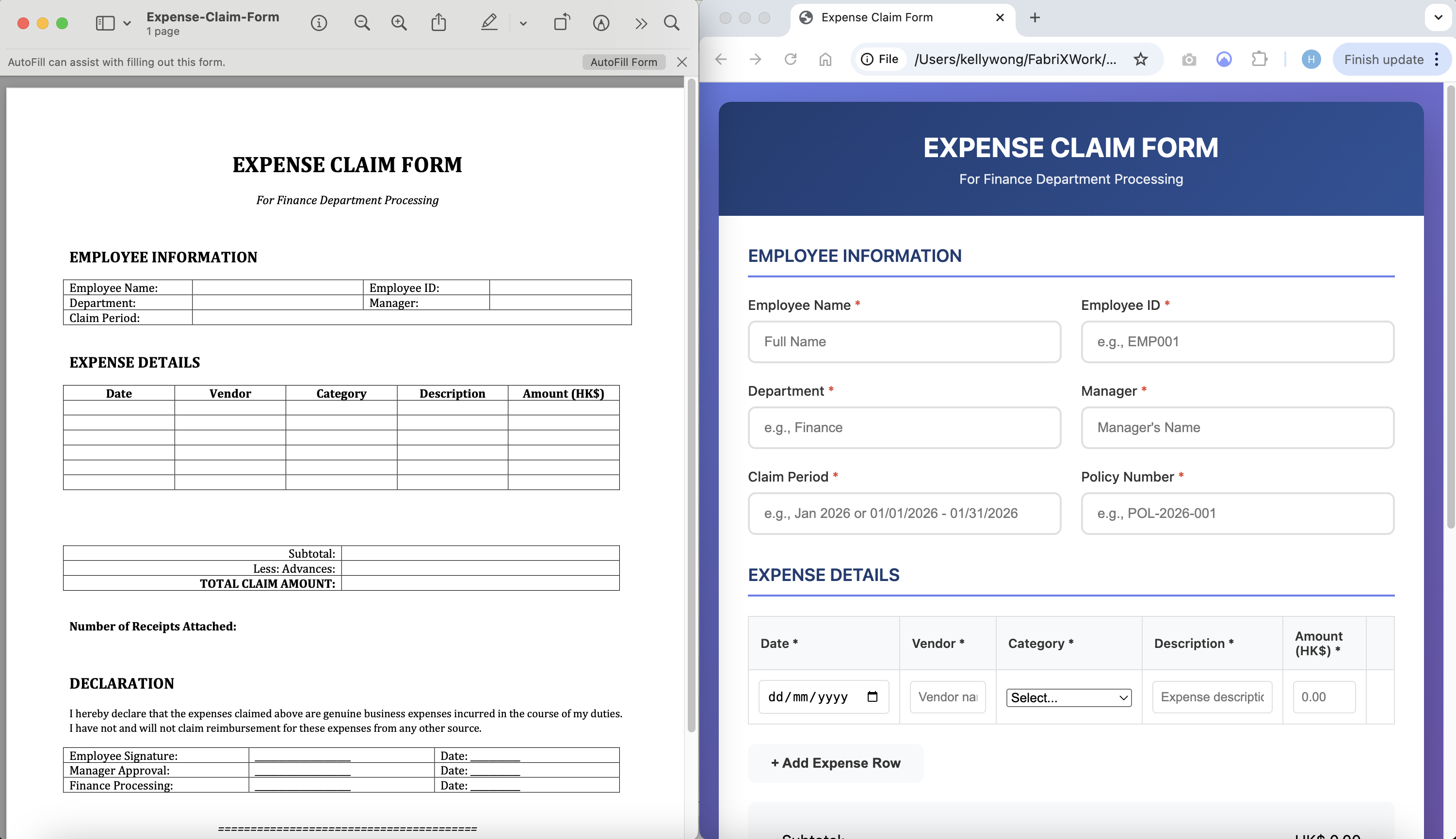
Scenario: You have a claim form (as PDF or image) and need to convert it to an interactive HTML form. When users submit, it creates a draft email with all form data ready to send to your claims email address.
Example Files:
expense-claim-form.png— Image or PDF of the claim form
Example Prompt:
Tip
Use Plan Mode first to review the proposed form structure before building. Learn more about the different modes in How to Interact with an AI Agent
Convert the claim form in expense-claim-form.pdf to an interactive HTML form that creates email drafts.

Features:
- Form validation (required fields, format validation)
- On submit: create draft email with all form data
- Email to: claims@company.com
- Subject: "New Claim Submission - [Policy Number]"
- Email body: formatted table with all responses
- Success message after email draft opens
- Mobile-responsive design

Technical:
- Single HTML file with inline CSS and JavaScript
- Use mailto: link to create email draft
- No server required
- Works offline
- Clean, professional styling

Save to: claim-form.html in outputs folder
Make It Your Own
Don't simply copy this prompt, adapt it. Ask yourself:
- What form are you converting: claim form, application, inquiry, registration?
- What's the submission method: email draft, localStorage, CSV download, webhook?
- What validation do you need: required fields, format patterns, value ranges?
Examples:
- Job application → "Email draft to HR, attach resume, include cover letter"
- Customer inquiry → "Email draft to sales team, include product interest"
More Examples to Inspire You
Example 2: Tender Comparison Form — See how complex table forms get converted
Scenario: You need to compare multiple vendor tenders side-by-side. Convert your tender comparison spreadsheet to an interactive HTML form with a comparison table.
Example Files:
tender-comparison-form.pdf— Tender comparison form template
Example Prompt:
Convert the tender comparison form in tender-comparison-form.pdf to an interactive HTML form with comparison table.

Features:
- Auto-calculate amounts (Quantity × Rate)
- Auto-calculate totals for each tenderer
- Auto-calculate savings vs budget

Technical:
- Single HTML file with inline CSS and JavaScript
- Table responsive (horizontal scroll on mobile)
- No external dependencies

Save to: tender-comparison.html in outputs folder
Make It Your Own
Adapt this for:
- Quote comparison: "Compare 3 quotes for equipment purchase"
- Bid evaluation: "Add weighting scores, technical evaluation"
- Price analysis: "Add historical pricing, market benchmarks"
Example 3: Service Application Form with Local Backend — See how forms with data storage work
Scenario: You need a service application form where customers can submit requests, and you can view/manage submissions locally with a simple admin panel.
Example Files:
service-application-form.pdf— Service application form templateservice-types.xlsx— Optional: list of available services
Example Prompt:
Convert the service application form in service-application-form.pdf to an interactive HTML form with local data storage and admin panel.

Features:
- Form validation (required fields, email/phone format)
- Save submissions to localStorage
- Admin panel to view all submissions
- Filter by service type, date, status
- Mark as contacted/completed
- Export to CSV
- Email notification (simulate with success message)

Technical:
- Single HTML file with inline CSS and JavaScript
- localStorage for data persistence
- Simple admin panel (password protected)
- No server required
- Works offline
- Clean, professional design

Save to: service-application.html in outputs folder
Make It Your Own
Adapt this for:
- Support tickets: "Add priority levels, category selection, ticket number generation"
- Booking requests: "Add availability calendar, resource selection, confirmation email"
- Quote requests: "Add product selection, quantity, budget range, timeline"
Make It Even Better
Quick Wins
- Use Plan Mode first for complex forms. Learn more about the different modes in How to Interact with an AI Agent
- Provide clear form designs: e.g. Screenshot, PDF, or image showing all fields and layout
- Specify field types clearly: e.g. "Email field with format validation, required"
- Define storage needs upfront: e.g. "localStorage for single-user, Node.js + database for multi-user"
- Request validation rules: e.g. "Email format, phone format, required fields, min/max lengths"
Review & Refine
Always test the generated form before deploying or sharing.
What to Check:
- Field accuracy — All fields from the original form are present
- Validation — Required fields, format validation work correctly
- Data storage — Submissions are saved correctly
- Export functionality — CSV/Excel export works
- Responsive design — Form works on desktop, tablet, and mobile
- Error handling — Clear error messages for users
How to Request Corrections:
For missing fields:
"The form is missing the [field name] field. Please add it as a [field type] with [validation rules]."
For validation issues:
"The [field name] validation isn't working correctly. It should validate [specific rule]."
For styling issues:
"The form styling doesn't match the original design. Please update [colors/layout/fonts] to match."
For backend issues:
"The form submissions aren't saving to the database. Please check the [API endpoint/database connection]."
Form-Specific Tips
- Email Draft Forms: Use mailto: for simple submission, no server needed, works offline
- Comparison Tables: Auto-calculate scores, highlight best values, export to CSV/PDF
- Local Backend Forms: Use localStorage for simple storage, add admin panel for management
Reference & Details
Advanced Prompting Tips — Get better results with these techniques
1. Provide Clear Form Designs
✅ Good: Screenshot, PDF, or image showing all fields, labels, and layout
❌ Vague: Text description of form fields
2. Specify Field Types and Validation
✅ Good: "Email field with format validation, required. Phone field with US format validation, optional"
❌ Vague: "Add input fields with validation"
3. Define Data Storage Requirements
✅ Good: "Save to localStorage for single-user. Include CSV export functionality"
❌ Vague: "Store the data somewhere"
4. Request Admin Features
✅ Good: "Include admin dashboard to view submissions, filter by date, export to CSV"
❌ Vague: "Let me see the submissions"
5. Specify Integration Needs
✅ Good: "Add email notification on submission, integrate with Mailchimp for newsletter signup"
❌ Vague: "Connect to our tools"
6. Define User Experience
✅ Good: "Show success message after submission with confirmation number. Send email confirmation"
❌ Vague: "Let user know it submitted"
7. Iterate on Complexity Start simple, then add features:
✅ Good: "First create basic form with localStorage. Then add admin dashboard. Then add CSV export"
❌ Vague: "Build everything at once"
More Adaptation Ideas — Extend beyond these examples
Common Form Types
| Form Type | Best For | Key Features |
|---|---|---|
| Contact Form | Lead generation, customer inquiries | Email validation, subject dropdown, auto-reply |
| Registration | Events, webinars, workshops | Multi-step, session selection, payment info |
| Feedback/Survey | Customer satisfaction, NPS | Rating scales, comments, anonymous option |
| Application | Jobs, memberships, programs | File uploads, multi-page, screening questions |
| Order Form | Product orders, service requests | Product selection, quantity, payment integration |
| Intake Form | Healthcare, legal, consulting | Confidential data, e-signature, document upload |
Storage Options
| Storage Type | Best For | Complexity |
|---|---|---|
| localStorage | Single-user, offline, demo/prototype | 🟢 Simple |
| JSON File | Small business, low volume, simple export | 🟢 Simple |
| SQLite | Multi-user, medium volume, production | 🟡 Moderate |
| MySQL/PostgreSQL | High volume, enterprise, complex queries | 🔴 Advanced |
| Cloud (Firebase) | Real-time, distributed, scalable | 🟡 Moderate |
Backend Options
| Backend Type | Best For | Tech Stack |
|---|---|---|
| No Backend | Static forms, email submission, third-party | HTML + Formspree/EmailJS |
| Node.js + Express | Custom APIs, real-time, JavaScript stack | Node, Express, SQLite/MySQL |
| Python + Flask | Data processing, ML integration, Python stack | Flask, SQLAlchemy, PostgreSQL |
| PHP + MySQL | Traditional hosting, WordPress integration | PHP, MySQL |
| Serverless | Low maintenance, pay-per-use, scalable | AWS Lambda, Vercel, Netlify |
Troubleshooting — Common issues and solutions
Quick Fixes
| Issue | What to Try |
|---|---|
| Form fields don't match design | "Compare with original form image. Add missing fields: [list fields]. Remove extra fields: [list fields]" |
| Validation not working | "Add client-side validation for [field]. Show error message when [condition]. Prevent submit if invalid" |
| Data not saving | "Check localStorage/database connection. Add console.log for debugging. Verify write permissions" |
| Export not working | "Check CSV generation logic. Verify file download permissions. Test in different browsers" |
| Form not responsive | "Ensure mobile-first CSS. Test on different screen sizes. Use responsive grid system" |
| File upload not working | "Check file input type. Verify upload folder permissions. Add file size/type validation" |
| Backend API errors | "Check server logs. Verify database connection. Test API endpoints with Postman" |
Form-Specific Issues
| Issue | Form Type | What to Try |
|---|---|---|
| Multi-step not progressing | Multi-step | "Check next button logic. Verify section visibility toggle. Add progress tracking" |
| Dropdown options wrong | All types | "Populate from data source. Check dynamic loading. Verify option values" |
| Date picker not working | All types | "Use HTML5 date input or datepicker library. Check browser compatibility" |
| Email notifications not sending | All types | "Configure SMTP or use email service (SendGrid, Mailgun). Check API keys" |
| Duplicate submissions | All types | "Add duplicate detection (email + timestamp). Implement cooldown period" |
| Form slow to load | Complex forms | "Lazy load sections. Optimize images. Minify CSS/JS" |
Technical Details — How the output works
Simple Form (localStorage)
Output Structure:
- Single HTML file with inline CSS and JavaScript
- Form fields with validation
- localStorage for data persistence
- Admin view to see submissions
- CSV export functionality
Pros:
- ✅ No server required
- ✅ Works offline
- ✅ Easy to deploy (just open HTML file)
- ✅ No database setup
Cons:
- ❌ Data only accessible on same device/browser
- ❌ Limited storage (5-10MB typically)
- ❌ Not suitable for production/multi-user
Best For: Prototypes, demos, single-user forms, offline-capable needs
Advanced Form (Node.js Backend)
Output Structure:
/project-folder
├── /frontend
│   ├── index.html (form)
│   ├── admin.html (dashboard)
│   ├── style.css
│   └── app.js
├── /backend
│   ├── server.js
│   ├── database.js
│   ├── routes/
│   └── /uploads
├── package.json
└── README.md
Tech Stack:
- Frontend: HTML5, CSS3 (Bootstrap 5), JavaScript (ES6+)
- Backend: Node.js, Express.js
- Database: SQLite (or MySQL/PostgreSQL)
- File Upload: Multer middleware
- Authentication: Simple session-based or JWT
Pros:
- ✅ Production-ready
- ✅ Multi-user support
- ✅ Centralized data storage
- ✅ Scalable
- ✅ API for integrations
Cons:
- ❌ Requires server setup
- ❌ More complex deployment
- ❌ Database maintenance needed
Best For: Production forms, multi-user access, high volume, integrations needed
Deployment Options
For localStorage Forms:
- GitHub Pages (free)
- Netlify Drop (free)
- Any static hosting
- Even open locally in browser
For Node.js Backend:
- Heroku (free tier available)
- Vercel (serverless functions)
- DigitalOcean App Platform
- AWS/GCP/Azure
- Self-hosted VPS
To update:
- Modify form design or fields
- Ask agent to regenerate with changes
- Deploy updated files
Related Use Cases
- Create a Promotional Website — Build landing pages to embed your HTML forms
- Auto-Fill Forms (DOCX, Excel, PDF) — Populate forms programmatically from structured data
- Create Presentation Slides from Your Documents — Present form analytics and submission insights