
Check Documents for Compliance
Automate document compliance checking and validation. No manual review, no missed requirements, no hours of tedious verification.
Why This Matters
The problem: Manually checking documents against compliance rules or requirements is time-consuming and error-prone, often taking hours with no guarantee of catching all issues.
The FabriXWork way: Your agent automatically reviews documents against your rule set and generates a detailed compliance report in minutes. Update the document, recheck instantly.
See It in Action: Claim Form Compliance Check
This demo shows how a claim form and validation rules become a detailed compliance report instantly.
Note: Some scenes in this video have been accelerated to 10× speed to enhance the viewing experience. The prompt used in this video can be found in the Featured Example section below.
How it Works:
┌──────────────────────────────────────────────────────────┐
│  INPUT                          OUTPUT                   │
│  ┌──────────────┐               ┌─────────────────────┐  │
│  │ rules.png    │               │  Compliance         │  │
│  │ (validation  │               │  Report             │  │
│  │   rules)     │    ──────►    │  • Required Fields  │  │
│  │              │     Agent     │    Check Results    │  │
│  │ filled-claim │     Review    │  • Pass/Fail Status │  │
│  │ -form.png    │               │  • Missing/Invalid  │  │
│  │ (filled by   │               │  • Recommendations  │  │
│  │  claimant)   │               │                     │  │
│  └──────────────┘               │      TXT / DOCX     │  │
│                                 │  (Ready to process) │  │
│                                 └─────────────────────┘  │
└──────────────────────────────────────────────────────────┘
The Pattern:
- You have validation rules (required fields, formats, acceptable values) as an image
- Agent reviews filled claim form against each rule systematically using OCR
- Agent generates detailed report with pass/fail for each field
- You review, request corrections from claimant, recheck if needed
Try It Out
Tip
Choose the scenario that best matches your needs, then adapt the prompt to fit your content and goals.
- Prepare your documents — Compliance rules/checklist, document to be reviewed
- Choose an agent — All agents support document review (Alex - Business Analyst is recommended for compliance checking)
- Connect your folder — Select agent → Click "Browse" → Choose folder
- Enter your prompt - Use the examples below as inspiration. Adapt them to your content and goals
Featured Example: Claim Form Compliance Check
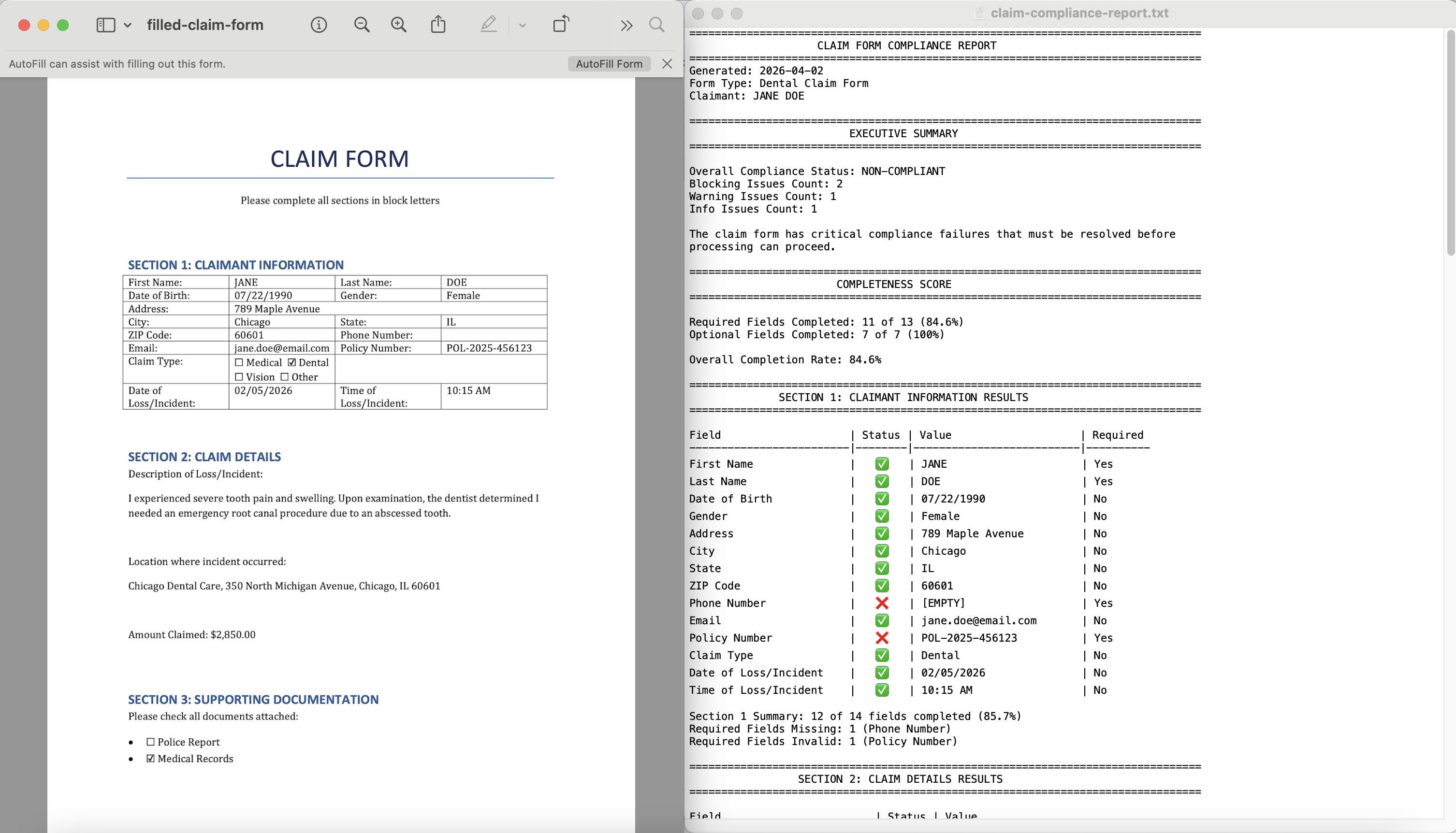
Scenario: You process insurance claims and need to verify that submitted claim forms are complete and valid before processing. You have a rule set image showing required fields and validation rules, plus filled claim forms from claimants.
Example Files:
rules.png— Image showing required fields and validation rulesfilled-claim-form.png— Filled claim form submitted by claimant
Example Prompt:
Tip
Use Plan Mode first to review the proposed checking framework before building. Learn more about the different modes in How to Interact with an AI Agent
Use the validation rules in rules.png to review the filled claim form in filled-claim-form.png and generate a compliance report.

Instructions:
1. Extract all validation rules from rules.png using OCR
2. Review each field in demo-claim-form.png against the rules

Output Requirements:
- Executive Summary (overall compliance status, blocking issues count)
- Completeness Score (percentage of required fields completed)
- Section 1 Results: Claimant Information (field-by-field status with ✅/❌)
- Section 2 Results: Claim Details (field-by-field status with ✅/❌)
- Section 3 Results: Supporting Documentation (checklist completeness)
- Issues Found (grouped by severity: Blocking, Warning, Info)
- Recommendations (specific corrections needed for each issue)
- Decision: Ready to Process / Needs Correction / Reject

Format: TXT report with tables and clear status indicators (✅/❌/⚠️)
Save to: claim-compliance-report.txt in outputs folder
Make It Your Own
Don't simply copy this prompt, adapt it. Ask yourself:
- What form are you validating: claim forms, applications, registrations, submissions?
- What validation rules: required fields, format patterns, acceptable value ranges?
- What severity levels: Blocking (can't process), Warning (needs attention), Info (suggestions)?
Adapt the structure for:
- Job application → "Check required fields → Validate email/phone format → Verify required attachments → Work eligibility"
- Vendor registration → "Validate tax ID format → Check required certifications → Verify bank details → Insurance coverage"
- Loan application → "Verify income documentation → Check credit score → Validate employment → Confirm collateral"
- Insurance enrollment → "Check personal info → Validate plan selection → Verify beneficiaries → Confirm payment method"
More Examples to Inspire You
Example 2: Contract Clause Verification — See how legal requirements get validated
Scenario: You're a legal assistant verifying that vendor contracts contain all required clauses according to company legal standards.
Example Files:
required-clauses.pdf— Legal requirements checklist with mandatory clausesvendor-contract.pdf— Contract document to reviewstandard-terms.pdf— Optional: company standard terms for comparison
Example Prompt:
Use the required clauses in required-clauses.pdf to review vendor-contract.pdf and generate a contract compliance report.

Checking Required:
1. Verify presence of each required clause
2. Check clause language matches requirements
3. Flag missing or non-compliant clauses
4. Note any additional clauses that need legal review
5. Prioritize by legal risk (Critical, High, Medium)

Output Requirements:
- Executive Summary (compliance status, critical gaps)
- Clause Checklist (each required clause with status)
- Missing Clauses (with recommended language)
- Non-Standard Clauses (flagged for legal review)
- Risk Assessment (by severity)
- Recommendations (specific edits required)

Format: TXT report with clear pass/fail indicators
Save to: contract-review-report.txt in outputs folder
Make It Your Own
Adapt this for:
- Employment contracts: "Verify statutory requirements, compensation clauses"
- NDAs: "Check confidentiality terms, duration, scope"
- Service agreements: "Validate SLA terms, liability limits, termination clauses"
Example 3: Invoice/Purchase Order Validation — See how invoices get validated against purchase orders
Scenario: You're in accounts payable and need to validate supplier invoices against purchase orders and company payment policies before processing payment.
Example Files:
invoice-validation-rules.png— Image showing required fields and validation rulessupplier-invoice.pdf— Invoice from supplier to validatepurchase-order.pdf— Reference PO for comparisonvendor-master.xlsx— Optional: approved vendor list and payment terms
Example Prompt:
Use the validation rules in invoice-validation-rules.png to review supplier-invoice.pdf and generate a compliance report.

Output Requirements:
- Validation Summary (overall status: Approve / Hold / Reject)
- Completeness Score (percentage of required fields present)
- Required Fields Check (field-by-field status)
- PO Match Results (line-by-line comparison)
- Calculation Verification (math accuracy check)
- Policy Compliance (payment terms, approvals)
- Issues Found (grouped by severity: Blocking, Warning)
- Recommendations (specific actions: Approve / Request Correction / Reject)

Format: TXT report with tables and clear status indicators (✅/❌/⚠️)
Save to: invoice-validation-report.txt in outputs folder
Make It Your Own
Adapt this for:
- Expense reports: "Validate employee expenses against policy limits, required receipts"
- Purchase requisitions: "Check approval workflow, budget codes, spending limits"
- Vendor onboarding: "Verify required documents, tax forms, banking details, certifications"
Make It Even Better
Quick Wins
- Use Plan Mode first for complex compliance reviews. Learn more about the different modes in How to Interact with an AI Agent
- Use images for visual rules: e.g. Annotated screenshot or image showing required fields, formats, and validation rules
- Provide clear rule documents: e.g. Numbered checklist, requirements with clear pass/fail criteria
- Specify review depth: e.g. "Comprehensive review of all 100+ items" or "High-level check of critical requirements only"
- Request severity prioritization: e.g. "Categorize issues as Blocking, Warning, Info"
- Ask for specific citations: e.g. "For each failed item, cite the exact field name and section"
Review & Refine
Always verify the generated compliance report before sharing or acting on it.
What to Check:
- Accuracy — Verify the agent correctly understood each rule
- Completeness — Ensure all rules were checked, none skipped
- Citations — Confirm issue locations are accurate
- Severity — Validate issue prioritization makes sense
How to Request Corrections:
For missed items:
"The report didn't check [specific rule/section]. Please review [document page/section] against [requirement] and add to the report."
For incorrect assessments:
"Item [X] was marked as Pass, but [specific issue]. Please re-review [location] and correct."
For missing citations:
"The report flags issues but doesn't cite locations. Please add page/section references for each issue."
For format changes:
"Convert the report to [DOCX/TXT/PDF/table format] for [stakeholder/presentation] purposes."
Form Validation Tips
- Claim Forms: Check required fields first, validate formats (policy numbers, dates), flag blocking issues
- Invoices: Cross-reference with PO, verify calculations, check payment terms compliance
- Applications: Verify all mandatory fields, check email/phone formats, confirm required attachments
- Contracts: Verify presence of required clauses, flag non-standard language, prioritize by legal risk
Reference & Details
Advanced Prompting Tips — Get better results with these techniques
1. Provide Clear Rule Documents
✅ Good: Image with highlighted required fields, numbered checklist with clear pass/fail criteria
❌ Vague: Unstructured requirements document
2. Specify Review Depth
✅ Good: "Comprehensive review of all 100+ compliance items"
❌ Vague: "Check the document"
3. Request Severity Prioritization
✅ Good: "Categorize issues as Blocking, Warning, Info based on processing impact"
❌ Vague: "Flag any issues"
4. Ask for Specific Citations
✅ Good: "For each failed item, cite the exact field name and section"
❌ Vague: "Show where the issues are"
5. Define Output Format
✅ Good: "Markdown report with tables, status indicators (✅/❌/⚠️), and approval decision"
❌ Vague: "Generate a report"
6. Request Remediation Steps
✅ Good: "For each failed item, provide specific corrective action"
❌ Vague: "List the problems"
7. Iterate on Review Depth After first review:
✅ Good: "Good start! Now dive deeper into section 3. Check each sub-requirement individually."
❌ Vague: "Make it more detailed"
More Adaptation Ideas — Extend beyond these examples
Common Compliance Checking Types
| Checking Type | Best For | Key Focus Areas |
|---|---|---|
| Form Validation | Claim forms, applications, registrations | Required fields, format validation, completeness |
| Invoice/PO Validation | Supplier invoices, expense reports | PO matching, calculations, payment terms |
| Compliance Checklist | Proposals, bids, submissions | All requirements met, signatures, attachments |
| Contract Review | Legal agreements, vendor contracts | Required clauses, terms, liability, termination |
| Visual/Brand Compliance | Marketing materials, presentations | Logos, colors, fonts, messaging, imagery |
| Regulatory Compliance | Financial reports, disclosures | Regulation citations, required disclosures |
| Quality Assurance | Documentation, procedures | Standards adherence, completeness, accuracy |
| Accessibility | Digital content, websites | WCAG guidelines, alt text, color contrast |
Document Sources
| Source Type | Best For | Tips |
|---|---|---|
| Image (PNG/JPG) | Rule sets, annotated forms, visual requirements | Use for highlighting required fields, format examples |
| PDF (fillable) | Forms, applications | Ensure text is selectable for review |
| PDF (scanned) | Signed documents, legacy files | May need OCR for text extraction |
| DOCX | Drafts, working documents | Preserves formatting, easy to edit |
| Images | Screenshots, diagrams | Use for visual compliance checking |
| Excel | Data-heavy compliance | Check formulas, data validation rules |
Troubleshooting — Common issues and solutions
Quick Fixes
| Issue | What to Try |
|---|---|
| Rules document not clear | "Use the numbered checklist on pages X-Y. Each numbered item is a separate rule to check" |
| Agent missing requirements | "Review section [X] more carefully. There are [N] sub-requirements that each need individual checking" |
| Report too high-level | "For each failed item, cite the exact page number, section, and quote the non-compliant text" |
| PDF not readable | "The PDF is scanned. Use OCR to extract text first, or convert to DOCX format" |
| Too many false positives | "Focus on [specific section] only. Ignore [sections] for this review" |
| Need different format | "Convert the report to a table format with columns: Rule, Status, Location, Issue, Action Required" |
| Need executive summary | "Add a 1-page executive summary at the top with: overall score, critical issues count, top 5 priorities" |
Compliance-Specific Issues
| Issue | Checking Type | What to Try |
|---|---|---|
| Missed subtle violations | Legal/Contract | "Review each clause word-by-word. Compare against required language in [section]" |
| Visual elements skipped | Brand/Marketing | "Check all images, logos, and color usage. Reference brand guidelines section [X]" |
| Citations incomplete | All types | "For every Pass and Fail, cite the exact document location (page + section)" |
| Severity unclear | All types | "Define severity: Critical = blocks submission, High = must fix, Medium = should fix, Low = nice to have" |
| No remediation steps | All types | "For each failed item, provide specific corrective action with example language" |
Output Formats — Technical details
Supported Output Formats:
- ✅ Markdown (.md) — Easy to read, convert to other formats, version control friendly
- ✅ TXT (.txt) — Simple plain text format for quick access and universal compatibility
- ✅ DOCX (.docx) — Professional format for sharing, easy to edit in Word
- ✅ Excel (.xlsx) — Checklist format with filters, sorting, status tracking
- ✅ PDF (.pdf) — Final distribution format, preserves formatting
Typical Report Structure:
- Executive Summary — Overall compliance score, critical issues, recommendation
- Compliance Score — Percentage breakdown by category
- Detailed Checklist — Rule-by-rule results with Pass/Fail/Needs Review
- Issues Found — Grouped by severity with citations
- Remediation Plan — Specific fixes with priority and ownership
- Appendix — Reference sections, evidence citations
To track progress:
- Save initial report as baseline
- Re-run compliance check after fixes
- Compare reports to track improvement
- Maintain audit trail of all reviews
Related Use Cases
- Auto-Fill Forms (DOCX, Excel, PDF) — Populate compliance forms and submission documents
- Create Presentation Slides from Your Documents — Present compliance findings to leadership or stakeholders
- Customer Insight & Strategy Recommendations — Analyze compliance patterns and recommend process improvements