
Create a Promotional Website
Build professional promotional websites in 30-60 minutes. No coding required, no expensive agencies, no weeks of development.
Why This Matters
The problem: Creating a professional promotional website traditionally takes weeks and involves significant effort, especially when coordinating with developers and managing multiple revisions.
The FabriXWork way: Your agent builds a professional Bootstrap website from your content in 30-60 minutes. Update the copy, regenerate instantly.
See It in Action: Product Launch Landing Page
This demo shows how product info and marketing copy become a professional landing page instantly.
Note: Some scenes in this video have been accelerated to 10× speed to enhance the viewing experience. The prompt used in this video can be found in the Featured Example section below.
How it Works:
┌──────────────────────────────────────────────────────────┐
│  INPUT                          OUTPUT                   │
│  ┌──────────────┐               ┌─────────────────────┐  │
│  │ product-     │               │  Product Launch     │  │
│  │ info.txt     │               │  Landing Page       │  │
│  │              │    ──────►    │  • Hero Section     │  │
│  │ marketing-   │     Agent     │  • Features         │  │
│  │ copy.txt     │     Build     │  • Social Proof     │  │
│  │              │               │  • Pricing + CTA    │  │
│  │ logo.png     │               │                     │  │
│  └──────────────┘               │  HTML + Bootstrap   │  │
│                                 │  (Ready to publish) │  │
│                                 └─────────────────────┘  │
└──────────────────────────────────────────────────────────┘
The Pattern:
- You have content (copy, brand assets, product info, images)
- Agent understands your website goals and audience
- Agent builds professional HTML website with Bootstrap
- You review, refine if needed
Try It Out
Tip
Choose the scenario that best matches your needs, then adapt the prompt to fit your content and goals.
- Prepare your content — Brand assets, marketing copy, product info, images, CTAs
- Choose an agent — Dev - Developer Agent is recommended for building website
- Connect your folder — Select agent → Click "Browse" → Choose folder
- Enter your prompt - Use the examples below as inspiration. Adapt them to your content and goals
Featured Example: Product Launch Landing Page
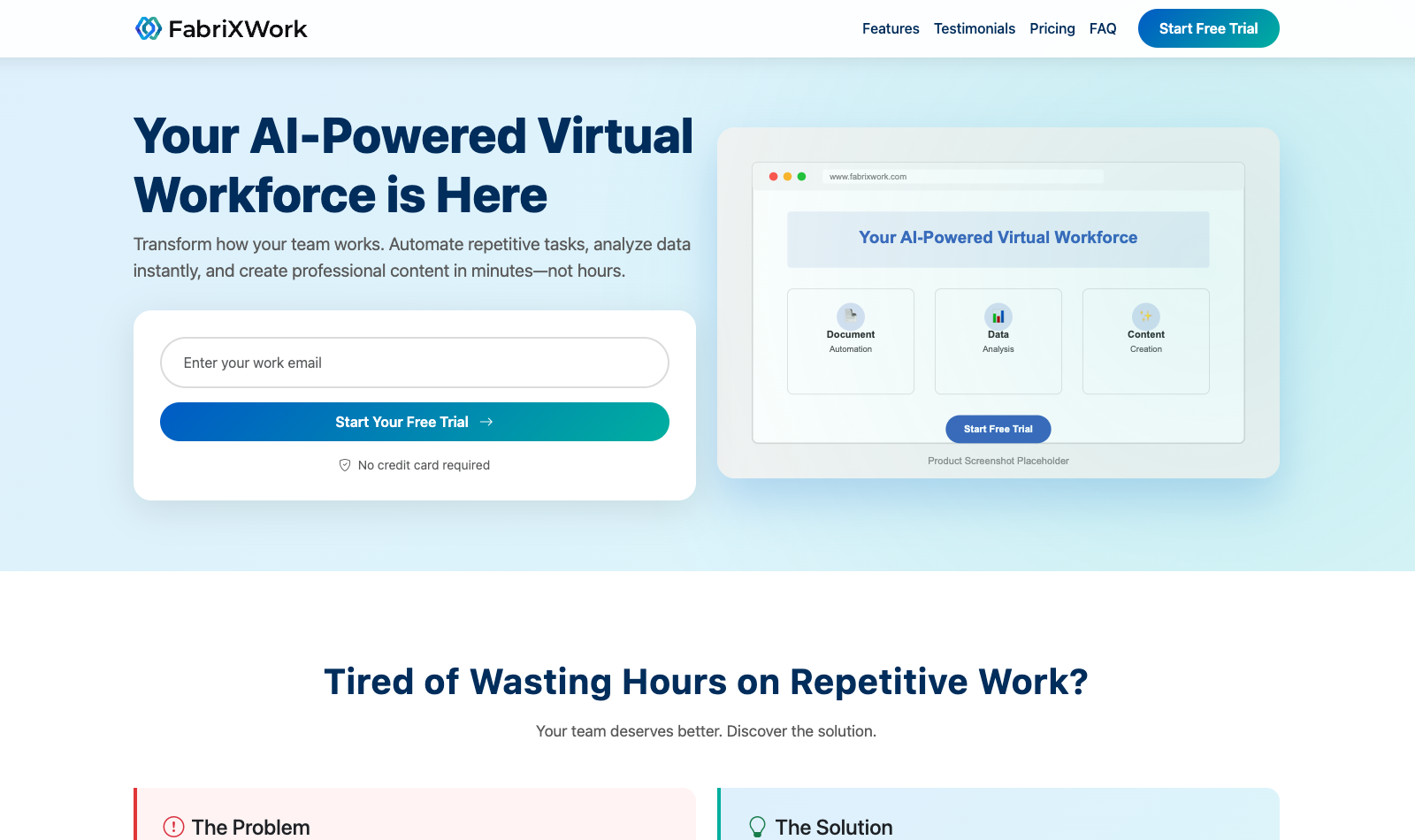
Scenario: You're launching a new product and need a landing page to collect early signups and build anticipation.
Example Files:
product-info.txt— Product description, features, benefitsmarketing-copy.txt— Headlines, value propositions, key messageslogo.png— Brand logoproduct-screenshot.png— Hero image
Example Prompt:
Tip
Use Plan Mode first to review the proposed structure before building. Learn more about the different modes in How to Interact with an AI Agent
Build a product promotional landing page for FabriXWork.

Required Sections:
1. Navigation — Includes the logo.svg, section links and a CTA button; fully responsive with a hamburger menu for smaller screens
2. Hero — Headline, subheadline, email signup form, and hero image
3. Problem / Solution — Key pain points and how the product addresses them
4. Features — 3–6 core features, each with supporting icons
5. Social Proof — Testimonials or quotes from beta users
6. Pricing — Early-bird offers or pricing tiers
7. FAQ — 5–7 commonly asked questions
8. Final CTA — Clear call-to-action with a sense of urgency and signup prompt

Technical:
- Single HTML file with Bootstrap 5 CSS
- Responsive design (mobile-first)
- Modern, clean aesthetic
- Form ready for integration

Style:
- Colors: Professional and modern style with brand colors blue and teal
- Include smooth animations

Save to: index.html in outputs folder
Make It Your Own
Don't simply copy this prompt, adapt it. Ask yourself:
- What are you launching: SaaS product, mobile app, physical product, service?
- What's your goal: collect emails, drive pre-orders, generate signups?
- What sections matter most: features, pricing, social proof, demo?
Examples:
- Mobile app → "Focus on app screenshots, features, App Store/Google Play links"
- Physical product → "Focus on benefits, lifestyle photos, customer testimonials"
More Examples to Inspire You
Example 2: Event Promotion Page — See how event details become registration pages
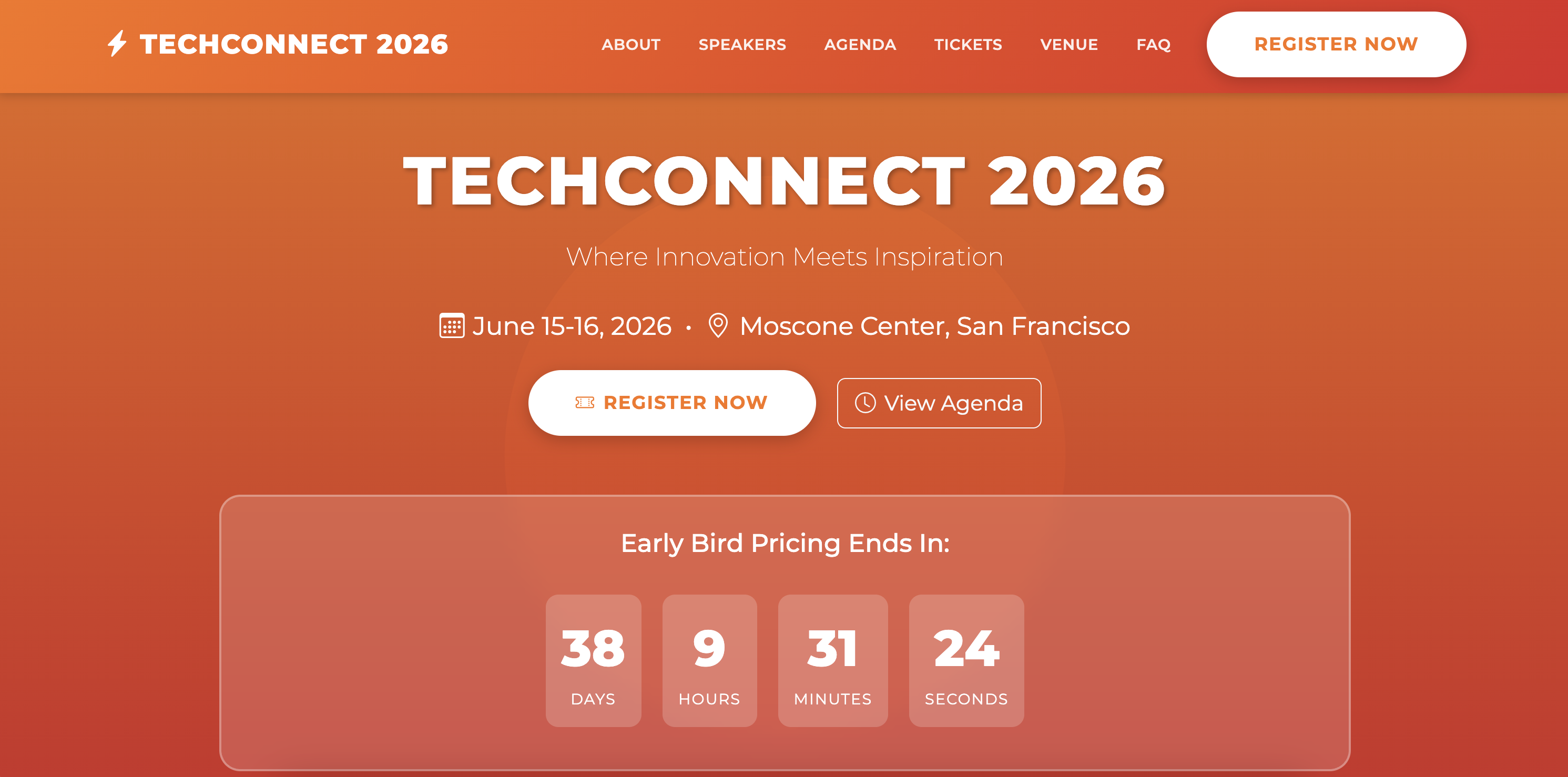
Scenario: You're organizing an event and need a registration page that showcases speakers, agenda, and drives ticket sales.
Example Files:
event-details.md— Event name, date, location, descriptionspeaker-info.md— Speaker bios and photosagenda.md— Schedule and sessionssponsor-logos/— Sponsor logo files
Example Prompt:
Build an event registration page for [EVENT NAME].

Required Sections:
1. Navigation — Includes section links and a CTA button; fully responsive with a hamburger menu for smaller screens
2. Hero — Event name, date, location, register CTA, countdown
3. About — What attendees will learn
4. Speakers — Speaker cards with photos
5. Agenda — Day-by-day schedule
6. Pricing — Ticket tiers (Early Bird, Regular, VIP)
7. Sponsors — Sponsor logos by tier
8. Venue — Location, map, hotels
9. FAQ — Common questions
10. Registration — Attendee form

Technical:
- Single HTML file with Bootstrap 5 CSS
- Countdown timer to event
- Registration form ready
- Mobile responsive

Style:
- Colors: [Your brand colors or "energetic and professional"]
- Clear schedule layout

Save to: index.html in outputs folder
Make It Your Own
Adapt this for:
- Conference: Full agenda with multiple tracks + speaker lineup
- Webinar: Simple schedule + single speaker + Zoom link
- Workshop: Focus on learning outcomes + limited seats
Example 3: SaaS Homepage — See how product info becomes conversion-optimized homepage
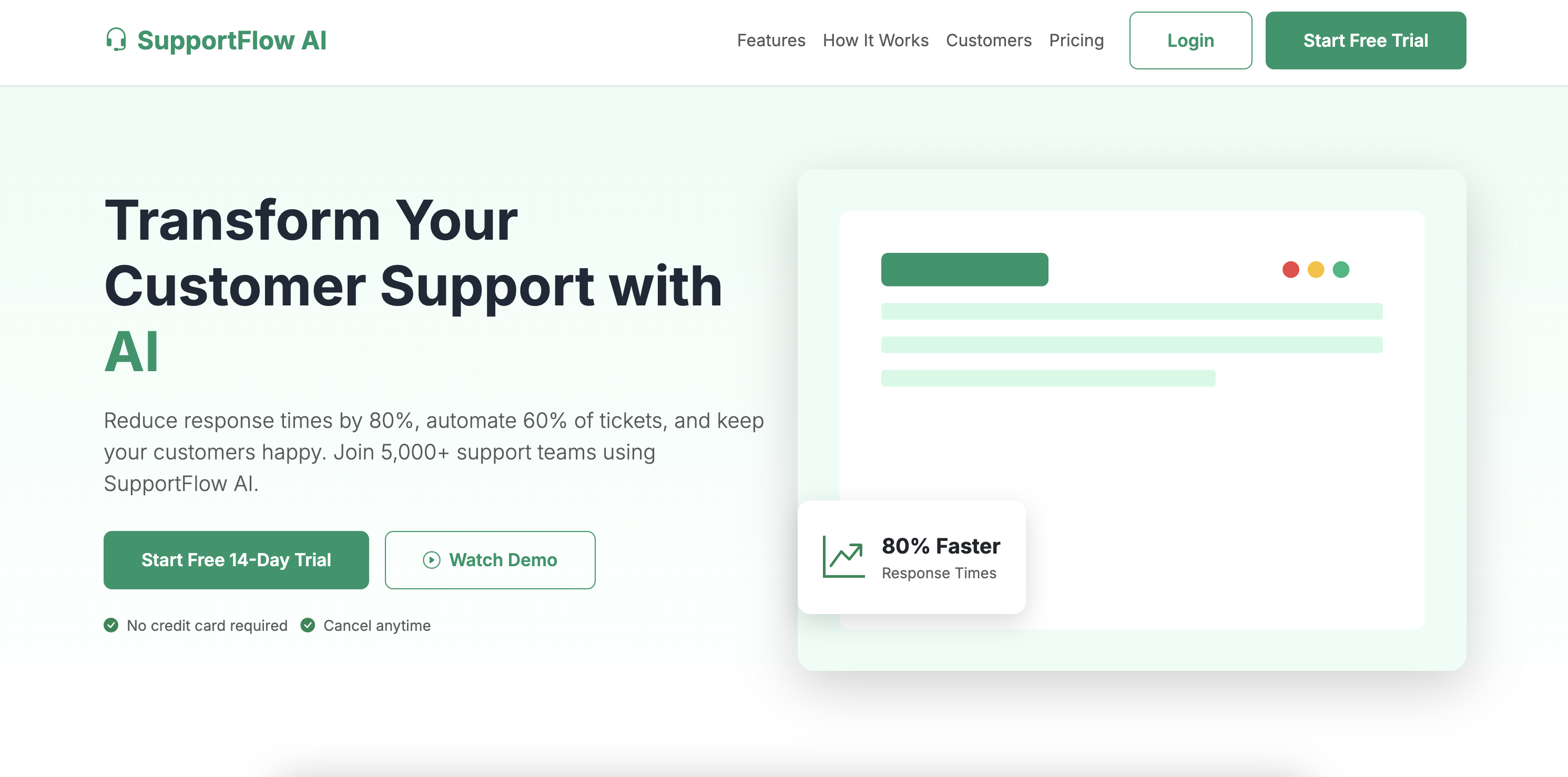
Scenario: You're launching a B2B SaaS platform and need a homepage that converts visitors to free trial signups.
Example Files:
product-overview.md— Value proposition, features, differentiatorscustomer-logos/— Customer logo filestestimonials.md— Customer quotes and case studiespricing.md— Pricing tiers and features
Example Prompt:
Build a SaaS homepage for [PRODUCT NAME].

Required Sections:
1. Navigation — Includes section links and a CTA button; fully responsive with a hamburger menu for smaller screens
2. Hero — Value prop, subhead, primary + secondary CTA, hero image
3. Social Proof — "Trusted by" with customer logos
4. Problem/Solution — Pain points and solution
5. Features — 6-9 features in grid
6. How It Works — 3-4 step process
7. Testimonials — Customer quotes with photos
8. Pricing — 3 tiers with features
9. FAQ — Common questions
10. Final CTA — Risk reversal (no credit card)
11. Footer — Links, legal, social

Technical:
- Single HTML file with Bootstrap 5 CSS
- Smooth scroll navigation
- Pricing toggle (monthly/annual)
- Mobile responsive

Style:
- Colors: [Professional SaaS blue/purple]
- Clean, modern aesthetic
- Clear visual hierarchy

Save to: index.html in outputs folder
Make It Your Own
Adapt this for:
- B2B SaaS: Focus on ROI, case studies, security/compliance
- B2C app: Focus on benefits, user photos, app store links
- Enterprise: Focus on scalability, integrations, support
Make It Even Better
Quick Wins
- Use Plan Mode first for complex websites. Learn more about the different modes in How to Interact with an AI Agent
- Provide brand guidelines: e.g. Logo files, color hex codes (#41b4a5), font names
- Be specific about goals: e.g. "Primary goal: collect email signups. Target conversion: 5%+"
- Reference websites you like: e.g. "We like the clean design of [website.com]"
- Specify technical requirements: e.g. "Integrate with Mailchimp, add Google Analytics"
Review & Refine
Always verify the generated website before publishing.
What to Check:
- Design accuracy — Colors, fonts, spacing match your brand
- Content accuracy — All text, pricing, and details are correct
- Functionality — All buttons, links, and forms work
- Responsive design — Looks good on desktop, tablet, and mobile
- Performance — Images optimized, loads quickly
How to Request Corrections:
For design issues:
"The [color/font/spacing] doesn't match our brand. Please use [specific details] instead."
For content errors:
"The [pricing/feature/testimonial] text is incorrect. Please update to: [correct text]."
For functionality issues:
"The [button/form/link] doesn't work on [mobile/desktop]. Please fix."
For layout refinements:
"The [section name] feels too [crowded/spacious]. Please adjust spacing."
Website-Specific Tips
- Landing Page: Put primary CTA above the fold, use social proof, keep forms short
- Event Page: Show speaker photos prominently, create urgency with countdown, make registration simple
- SaaS Homepage: Lead with value prop, show product early, make pricing transparent
Reference & Details
Advanced Prompting Tips — Get better results with these techniques
1. Provide Brand Guidelines
✅ Good: Logo files, color hex codes (#41b4a5), font names
❌ Vague: "Make it look professional"
2. Be Specific About Goals
✅ Good: "Primary goal: collect email signups. Target conversion: 5%+"
❌ Vague: "Make it convert well"
3. Provide Quality Content
✅ Good: Well-written copy, high-res images, real testimonials
❌ Vague: Placeholder text, low-res images
4. Reference Websites You Like
✅ Good: "We like the clean design of [website.com]"
❌ Vague: "Make it look modern"
5. Specify Technical Requirements
✅ Good: "Integrate with Mailchimp, add Google Analytics"
❌ Vague: "Make it work with our tools"
6. Iterate in Stages
✅ Good: "First finalize hero, then features, then pricing..."
❌ Vague: "Build everything at once"
7. Test Before Launch After generating the HTML file:
- Open in Chrome, Safari, Firefox, Edge
- Test on desktop, tablet, and mobile
- Click all buttons and links
- Test form submissions
- Check loading speed (target: < 3 seconds)
More Adaptation Ideas — Extend beyond these examples
Common Website Types
| Website Type | Best For | Key Sections |
|---|---|---|
| Product Launch | SaaS launches, app releases, pre-launch | Hero, features, social proof, pricing, CTA |
| Event Promotion | Conferences, webinars, workshops | Speakers, agenda, pricing, registration |
| SaaS Homepage | B2B SaaS, subscription services | Nav, hero, features, pricing, testimonials |
| Portfolio | Designers, developers, creatives | About, work samples, case studies, contact |
| Restaurant | Menus, reservations, location | Menu, gallery, hours, reservation form |
| E-commerce | Product sales, online stores | Product grid, cart, checkout, reviews |
Content Sources
| Source Type | Best For | Tips |
|---|---|---|
| Markdown Docs | Copy, descriptions, FAQs | Use clear headings, separate sections |
| Excel/CSV | Pricing tables, feature comparisons | Use columns for tier names and features |
| Images | Logos, screenshots, team photos | Use high-res, optimize for web |
| Brand Guidelines | Colors, fonts, visual identity | Include hex codes, font names, logo variants |
Troubleshooting — Common issues and solutions
Quick Fixes
| Issue | What to Try |
|---|---|
| Design doesn't match brand | "Use these colors: #XXX, #YYY. Font: [Name]" |
| Website looks dated | "Use modern design like [reference site]" |
| Forms don't submit | "Add form action for [Mailchimp/HubSpot]" |
| Images don't load | "Images in /images/. Update paths to relative" |
| Mobile layout broken | "Ensure mobile-first responsive design" |
| Slow loading | "Optimize images for web, use SVG for logos" |
Website-Specific Issues
| Issue | Website Type | What to Try |
|---|---|---|
| Low conversion | All types | "Add social proof, simplify forms, prominent CTA" |
| Confusing navigation | Multi-section | "Simplify menu, add anchor links" |
| Pricing unclear | SaaS/Product | "Show pricing early, compare tiers clearly" |
| No urgency | Event/Launch | "Add countdown, show limited spots" |
| Doesn't work on mobile | All types | "Mobile-first design, test touch targets" |
Technical Details — How the output works
Output Format:
- Single self-contained HTML file (Bootstrap 5 CSS via CDN)
- All custom CSS inline in
<style>tag - JavaScript inline for interactions (countdown, forms, etc.)
- Works in any modern web browser (Chrome, Safari, Edge, Firefox)
- Responsive design (desktop, tablet, mobile)
Features:
- ✅ Bootstrap 5 framework (latest version)
- ✅ Mobile-first responsive design
- ✅ Modern, clean aesthetic
- ✅ Smooth animations and transitions
- ✅ Form-ready for integration (Mailchimp, HubSpot, etc.)
- ✅ SEO-friendly structure (semantic HTML, meta tags)
To publish:
- Upload to any web hosting (Netlify, Vercel, GitHub Pages)
- Use as-is for quick landing pages
- Integrate with backend for form submissions
- Add Google Analytics for tracking
To update:
- Modify your source content
- Ask agent to regenerate with changes
- Replace the old HTML file
To customize:
- Edit HTML directly for minor tweaks
- Add custom CSS for branding
- Integrate with marketing tools (Mailchimp, ConvertKit, etc.)
Related Use Cases
- Convert Static Forms to HTML Forms — Convert lead capture forms to interactive HTML with data storage
- Create Presentation Slides from Your Documents — Create pitch decks to complement your website
- Auto-Fill Forms (DOCX, Excel, PDF) — Populate lead capture forms with CRM data