
Product Positioning & Strengths
FabriXWork reimagines how teams work with AI. Instead of a generic chatbot, you get a team of specialized agents that work alongside you, understand your files, and execute real business tasks. Everything runs locally on your machine, keeping your data private and secure.
Core Strengths of FabriXWork
FabriXWork stands out from other AI tools with six key differentiators, ordered from what you'll notice first to what makes it all possible.
1. Designed for Non-Technical Users
FabriXWork is built for users with non-technical backgrounds. The interface is simplified and designed like popular messenger applications, making AI accessible to everyone.
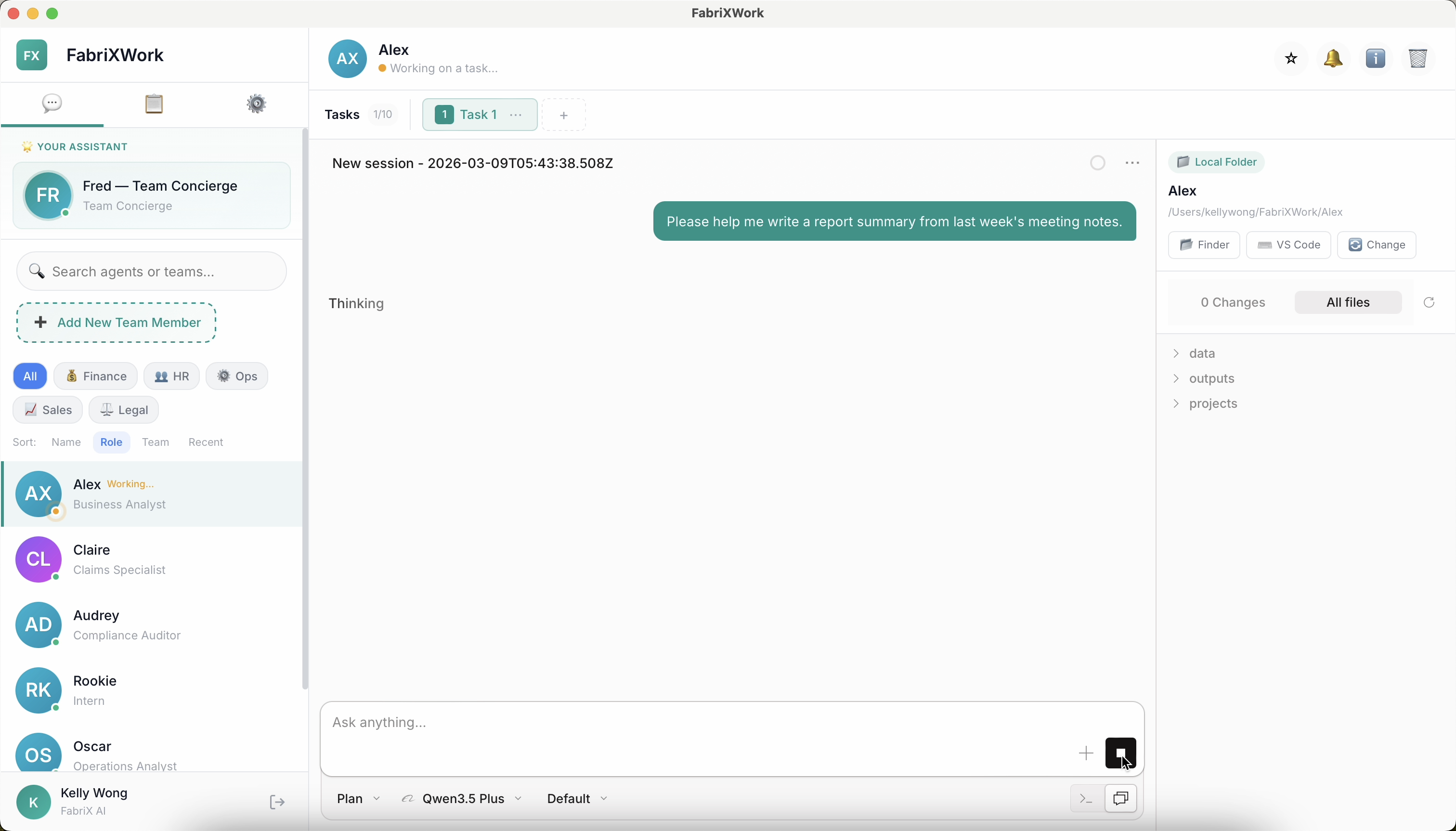
Key Design Principles:
| Feature | What It Looks Like | Why It Matters |
|---|---|---|
| Messenger-style UI | Chat interface similar to WhatsApp, Slack, or Teams | Familiar and intuitive, no learning curve |
| Simple agent switching | Click any agent in the sidebar to start chatting | Easily work with multiple specialists |
| Conversational interaction | Just type naturally, like messaging a colleague | No technical commands or syntax needed |
How It Works:
1. Browse agents in the sidebar (like contacts in a messaging app)
2. Click an agent to open the chat
3. Type your request in natural language
4. Switch to another agent anytime (they work independently)
Benefits:
- ✅ No training required - If you can send a message, you can use FabriXWork
- ✅ Flexible workflow - Switch between agents and tasks seamlessly
- ✅ Build your own helper - Over time, agents learn your preferences and become personalized assistants
2. Each Agent Has Pre-Defined Skills
Every agent comes with specialized capabilities designed for specific tasks. You don't need to train them from scratch, just pick the right agent for the job.
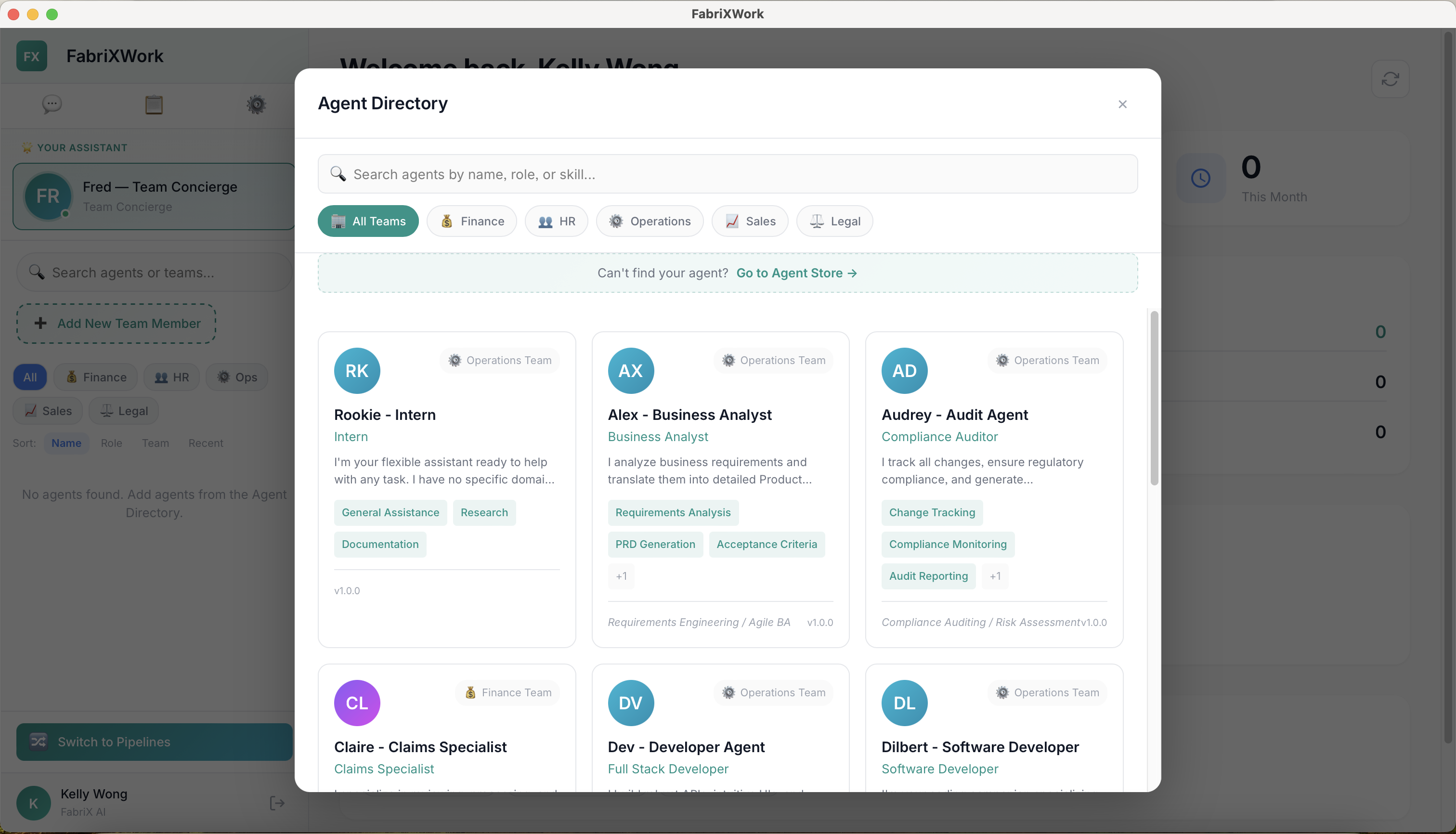
Example Agents:
| Agent | Role | Key Skills |
|---|---|---|
| Rookie - Intern | General Assistant | General Assistance, Research, Documentation |
| Alex - Business Analyst | Business Analyst | Requirements Analysis, PRD Generation, Acceptance Criteria |
| Audrey - Audit Agent | Compliance Auditor | Change Tracking, Compliance Monitoring, Audit Reporting |
| Claire - Claims Specialist | Claims Specialist | Document Analysis, Claim Processing, Report Generation |
| Dev - Developer Agent | Full Stack Developer | API Development, UI Development, Database Design |
| Dilbert - Software Developer | Software Developer | Code Development, Code Review, Debugging |
Benefits of pre-defined skills:
- 🎯 Task-specific expertise - Each agent is optimized for its domain
- 🚀 Ready to use - No training or configuration required
- 📚 Consistent quality - Standardized approaches to common tasks
- 🔄 Easy to swap - Pick different agents for different tasks
3. Multi-Tasking Support
Each agent can work on multiple tasks at the same time. You don't have to wait for one task to finish before starting another with the same agent.
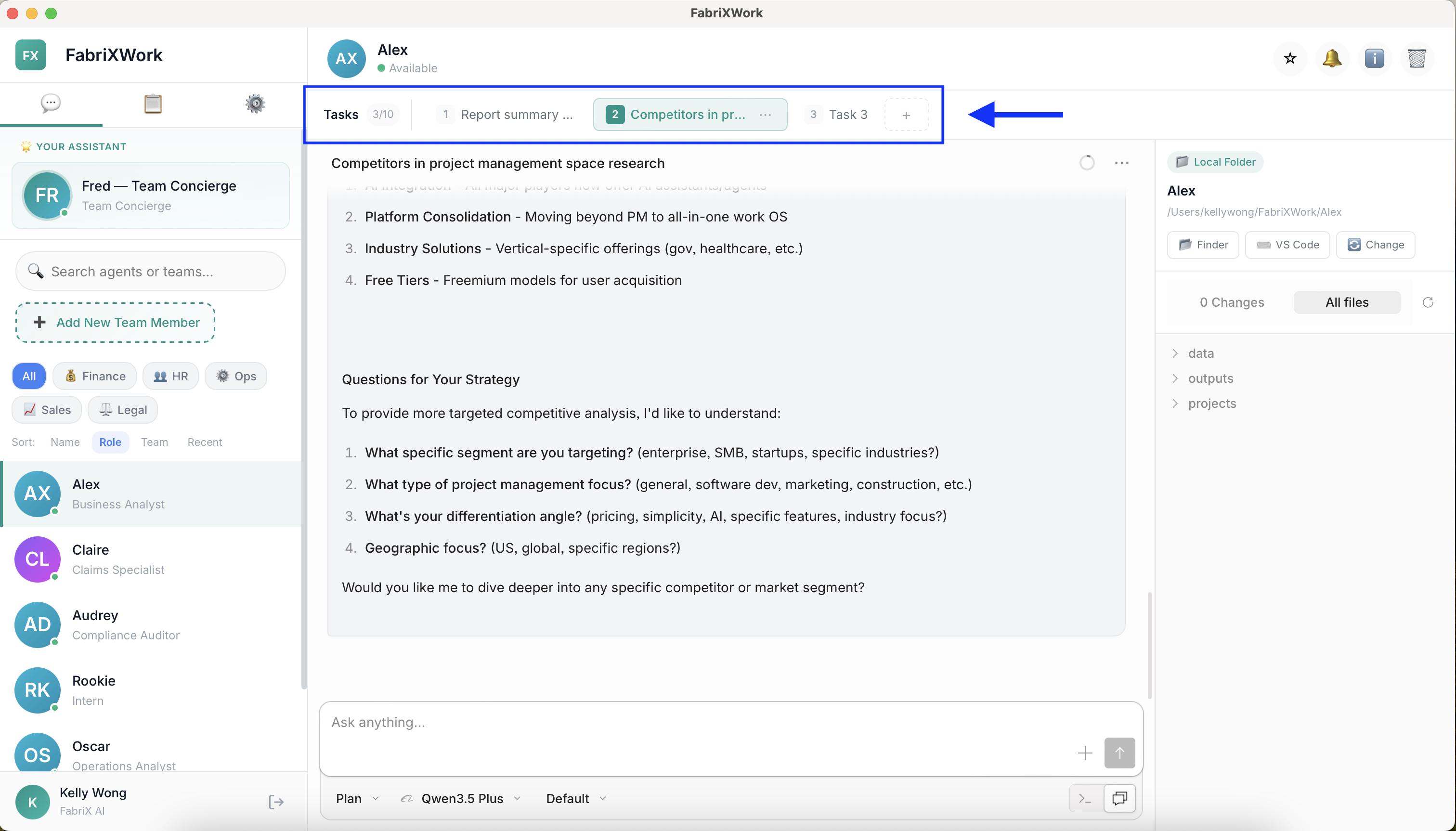
How it works in practice:
Working with Alex - Business Analyst:

Task 1: "Now write a report summary from last week's meeting notes"
        → Alex starts writing... (both tasks running in parallel)

You click the "+" button to open Task 2

Task 2: "Research competitors in the project management space"
        → Alex starts researching... (still running)

You switch between Task 1 and Task 2 tabs at the top
Both tasks continue independently, each with its own conversation.
What you'll see:
- Task tabs appear at the top of the chat window (e.g., "Task 1", "Task 2")
- Click "+" to start a new task with the same agent
- Switch between tabs to check progress or continue conversations
- Each task maintains its own conversation history and context
Benefits:
- ✅ No waiting around - Start new work without waiting for previous tasks to finish
- ✅ Organized workflow - Keep different topics in separate tabs
- ✅ Flexible pacing - Check on long-running tasks while working on quick ones
- ✅ Context preservation - Each task maintains its own conversation thread
4. Work Beyond Coding Purposes
Unlike AI developer tools (e.g., ChatGPT, GitHub Copilot, Replit, etc.), FabriXWork is built for general business workflows, not just software development.
What you can do (no coding required):
- 📝 Document Automation - Auto-fill forms, generate reports, create templates
- 📊 Data Analysis - Research, summarize, structure information
- 📑 Content Creation - Presentations, emails, marketing materials
- 🔬 Research - Compile databases, analyze trends, gather insights
- 📋 Administrative Tasks - Schedule management, note-taking, follow-ups
Common use cases:
| Role | Use Case |
|---|---|
| Marketing | Create presentation decks, build KOL databases, draft campaign materials |
| Finance | Auto-fill reporting templates, generate expense summaries |
| Operations | Document process workflows, create training materials |
| HR | Generate job descriptions, compile candidate summaries |
| Legal | Review contract changes, track compliance requirements |
5. Agents Interact with Local Files
FabriXWork agents can read from and write to files on your computer. They don't just chat, they execute real work on your documents.
What agents can do:
- 📄 Read and analyze documents (DOCX, PDF, TXT, CSV)
- ✏️ Write and modify files (create reports, fill forms, generate content)
- 📊 Process spreadsheets (extract data, create summaries, format tables)
- 🖼️ Generate presentations (create slides from outlines)
- 🔍 Search and organize files (find information, categorize content)
Example workflow:
1. You give instruction: "Create a project status report from the files in my Reports folder"
2. Agent reads the source files in your connected folder
3. Agent processes and analyzes the content
4. Agent generates a new DOCX file with the formatted report
5. You find the output file in your designated output folder
6. Everything Runs Locally
All agent operations happen on your local machine. Your files are processed locally and never uploaded to external cloud services.
Why it matters:
- ✅ Data privacy - Sensitive information stays on your machine
- ✅ No data leakage risk - Files don't leave your controlled environment
- ✅ Compliance-friendly - Meets enterprise data residency requirements
- ✅ Works offline - No internet dependency for core functionality
What you should know:
- Agents can only access files within your designated connected folders
- You control which folders agents can interact with
- No automatic cloud sync unless you explicitly enable it
What's Next?
- Usage Boundaries & Guidelines - Understand approved usage scope
- Installation - Get started with setup