
How to Choose the Right AI Agent
FabriXWork offers multiple specialized agents, each designed for specific tasks. This guide helps you select the right agent for your needs.
Why Agent Selection Matters
Using the right agent for your task is like hiring the right expert for a job:
- Better results — Specialized agents produce higher quality output
- Faster completion — Agents work more efficiently in their domain
- Fewer iterations — Less back-and-forth to get what you need
- Cost effective — Right agent = fewer wasted tokens
Meet the Agent Directory
The Agent Directory is where you browse and add agents to your team.
Accessing the Directory
- Click "+ Add New Team Member" in the sidebar
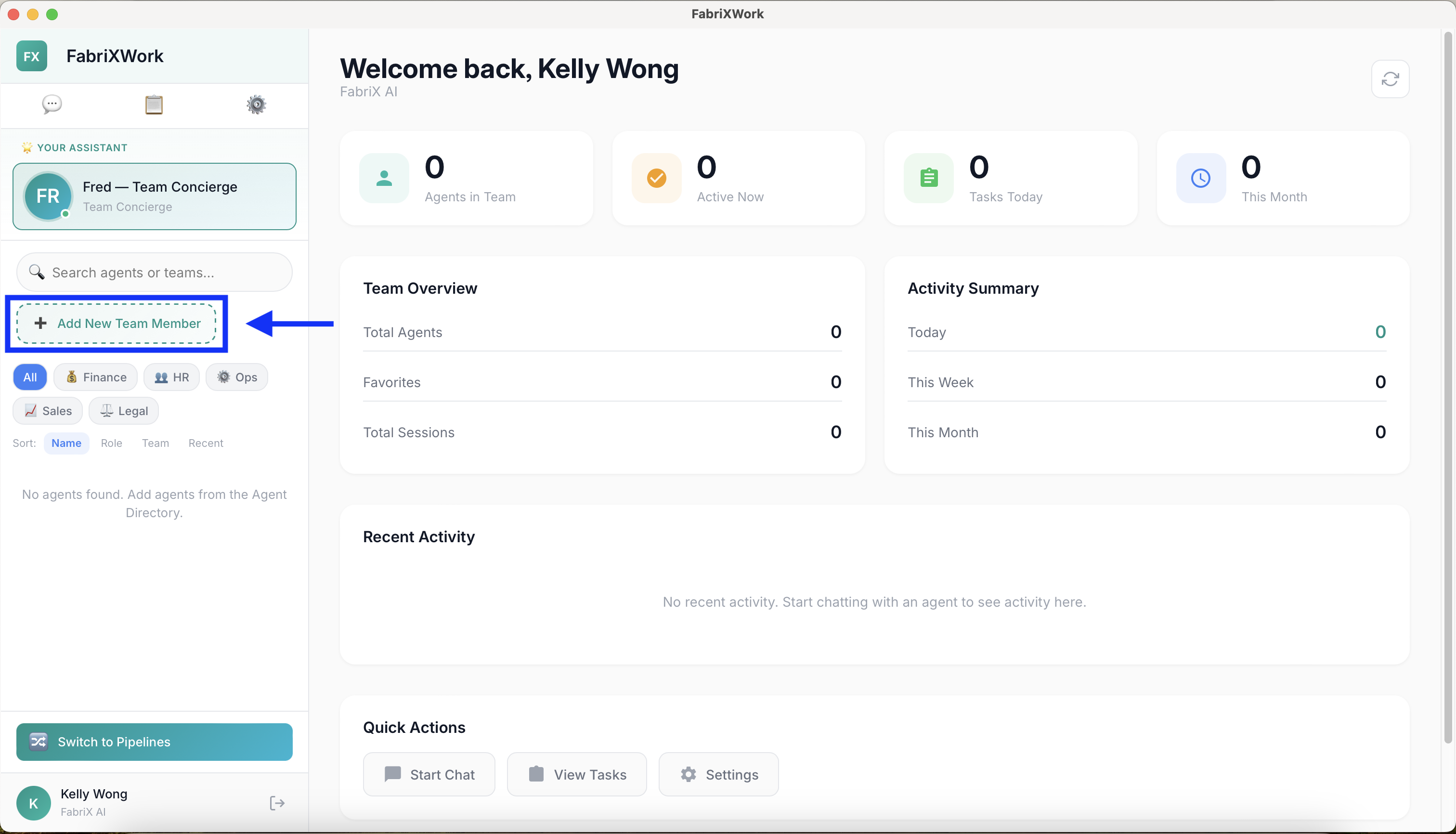
- Browse or search for agents
- View agent profiles to understand their capabilities
- Click "Add to My Team" to add an agent
Agent Profile Information
Each agent profile shows:
- Role/Title — What the agent does (e.g., "Business Analyst")
- Team/Category — Which department (e.g., Operations, Creative, Technical)
- Capabilities — Key tasks the agent excels at
- Sample use cases — Example scenarios
- Recommended for — Task types this agent handles best
Agent Directory
Here's the complete list of available agents organized by their specialty:
Concierge
| Agent | Role | Best For | Capabilities |
|---|---|---|---|
| Fred | Team Concierge | Finding the right agent, onboarding, workflow planning | Team Coordination, Onboarding Assistance, Workflow Planning |
Operations Team
| Agent | Role | Best For | Capabilities |
|---|---|---|---|
| Alex | Business Analyst | Requirements analysis, PRD generation | Requirements Analysis, PRD Generation, Acceptance Criteria |
| Riley | DevOps Engineer | CI/CD pipelines, deployment automation | CI/CD Pipeline, Deployment Automation, Release Management |
| Dilbert | Software Developer | Code development, review, debugging | Code Development, Code Review, Debugging |
| Simon | Site Reliability Engineer | System monitoring, incident response | System Monitoring, Incident Response, Performance Optimization |
| Tina | QA Engineer | Test case design, test automation | Test Case Design, Test Automation, Bug Reporting |
| Dev | Full Stack Developer | APIs, UIs, database schemas | API Development, UI Development, Database Design |
| Sam | Security Engineer | Security scanning, vulnerability assessment | Security Scanning, Vulnerability Assessment, Code Review |
| Oscar | Operations Analyst | Process analysis, KPI tracking | Process Analysis, KPI Tracking, Data Analysis |
| Audrey | Compliance Auditor | Change tracking, compliance monitoring | Change Tracking, Compliance Monitoring, Audit Reporting |
| Rookie | Intern | General assistance, research, documentation | General Assistance, Research, Documentation |
Finance Team
| Agent | Role | Best For | Capabilities |
|---|---|---|---|
| Claire | Claims Specialist | Insurance claims review and processing | Document Analysis, Claim Processing, Report Generation |
Decision Framework
Use this framework to choose the right agent:
Step 1: Identify Your Task Type
| If your task is... | Choose... |
|---|---|
| Requirements analysis, PRD creation | Alex - Business Analyst |
| Coding, development, debugging | Dilbert or Dev - Developer Agents |
| CI/CD, deployments | Riley - Release Agent |
| System monitoring, reliability | Simon - SRE Agent |
| Testing, QA | Tina - Test Agent |
| Security scanning, vulnerability assessment | Sam - Security Agent |
| Process analysis, KPI tracking | Oscar - Operations Analyst |
| Compliance, audit reporting | Audrey - Audit Agent |
| Insurance claims processing | Claire - Claims Specialist |
| General assistance, research | Rookie - Intern |
| Not sure which agent to use | Fred - Team Concierge |
Step 2: Consider the Output Format
| Output type | Recommended agent |
|---|---|
| Requirements documents, PRDs | Alex - Business Analyst |
| Code, scripts, APIs | Dilbert or Dev |
| Deployment pipelines | Riley - Release Agent |
| Test cases, automation scripts | Tina - Test Agent |
| Security reports | Sam - Security Agent |
| Process improvement recommendations | Oscar - Operations Analyst |
| Audit reports, compliance docs | Audrey - Audit Agent |
| Claims analysis, reports | Claire - Claims Specialist |
Step 3: Match Expertise to Complexity
| Task complexity | Agent selection approach |
|---|---|
| Simple (general tasks, research) | Rookie - Intern |
| Moderate (specialized domain tasks) | Specialized agent in relevant domain |
| Complex (multi-disciplinary projects) | Multiple specialized agents in sequence |
Common Scenarios
Scenario 1: "I need to create a product requirements document"
Best agent: Alex - Business Analyst
Why: Alex specializes in analyzing business requirements and translating them into detailed PRDs with acceptance criteria.
Scenario 2: "I need to build a new feature with API and UI"
Best agent: Dev - Developer Agent
Why: Dev is a full stack developer who builds robust APIs, intuitive UIs, and efficient database schemas.
Alternative: Dilbert - Software Developer (for code-focused development work)
Scenario 3: "I need to set up automated deployments"
Best agent: Riley - Release Agent
Why: Riley manages CI/CD pipelines and coordinates deployments to ensure smooth releases.
Scenario 4: "I need to ensure our code is secure"
Best agent: Sam - Security Agent
Why: Sam scans code for vulnerabilities, identifies security risks, and implements fixes.
Scenario 5: "I need comprehensive test coverage"
Best agent: Tina - Test Agent
Why: Tina creates comprehensive test cases and automation scripts to ensure systems work correctly.
Scenario 6: "I need to monitor system health and respond to incidents"
Best agent: Simon - SRE Agent
Why: Simon monitors system health, responds to alerts, and ensures high availability.
Scenario 7: "I need to analyze and improve our operational processes"
Best agent: Oscar - Operations Analyst
Why: Oscar analyzes operational processes, identifies inefficiencies, and recommends improvements.
Scenario 8: "I need to ensure regulatory compliance"
Best agent: Audrey - Audit Agent
Why: Audrey tracks changes, ensures regulatory compliance, and generates comprehensive audit reports.
Scenario 9: "I need to process insurance claims"
Best agent: Claire - Claims Specialist
Why: Claire specializes in reviewing, processing, and filing insurance claims.
Scenario 10: "I'm not sure which agent I need"
Best agent: Fred - Team Concierge
Why: Fred helps you find the right agent for any task and answers questions about using FabriXWork.
Using Multiple Agents
For complex projects, consider using multiple agents in sequence:
Example: New Feature Development
1. Alex (Business Analyst)
   ↓ Creates PRD with requirements and acceptance criteria

2. Dev (Developer Agent)
   ↓ Builds API, UI, and database schema

3. Tina (Test Agent)
   ↓ Creates test cases and automation scripts

4. Sam (Security Agent)
   ↓ Scans code for vulnerabilities

5. Riley (Release Agent)
   ↓ Sets up CI/CD pipeline for deployment

6. Simon (SRE Agent)
   ↓ Monitors system health post-deployment
Example: Compliance Project
1. Oscar (Operations Analyst)
   ↓ Analyzes current processes and identifies gaps

2. Audrey (Audit Agent)
   ↓ Ensures regulatory compliance and generates audit report

3. Dev (Developer Agent)
   ↓ Implements required technical changes

4. Sam (Security Agent)
   ↓ Validates security controls
Tips for Multi-Agent Workflows
- Start with requirements — Use Alex (Business Analyst) to define clear requirements
- Build and test — Developers build, then QA tests
- Security review — Always include security scanning before deployment
- Automate deployment — Use Riley to set up reliable CI/CD
- Monitor post-deployment — Simon ensures ongoing system health
- Share context — Keep all agents working from the same connected folder
- Review between handoffs — Check output before passing to next agent
When to Ask Fred for Help
Not sure which agent to use? Fred — Team Concierge can help!
Ask Fred:
"Which agent should I use to create a competitive analysis report?"
"I need to [your task]. Which agent is best for this?"
"What's the difference between Alex and Sam?"
Fred will recommend the right agent based on your specific needs.
Quick Selection Guide
For Requirements & Analysis:
- PRD creation → Alex
- Process analysis → Oscar
- Business requirements → Alex
For Development Tasks:
- Full stack development → Dev
- Code development → Dilbert
- API development → Dev
- UI development → Dev
- Database design → Dev
For DevOps & Deployment:
- CI/CD pipelines → Riley
- Deployment automation → Riley
- Release management → Riley
For Quality & Testing:
- Test case design → Tina
- Test automation → Tina
- Bug reporting → Tina
For Security & Compliance:
- Security scanning → Sam
- Vulnerability assessment → Sam
- Compliance monitoring → Audrey
- Audit reporting → Audrey
For Operations:
- System monitoring → Simon
- Incident response → Simon
- Performance optimization → Simon
- KPI tracking → Oscar
For Finance:
- Claims processing → Claire
- Document analysis (claims) → Claire
For General Help:
- Not sure which agent → Fred
- Research tasks → Rookie
- Documentation → Rookie
What's Next?
Now that you know how to choose agents:
- Learn best practices for interaction → Interact with an Agent
- Organize your folders effectively → Folder Organization
- See real use cases → Use Cases Directory